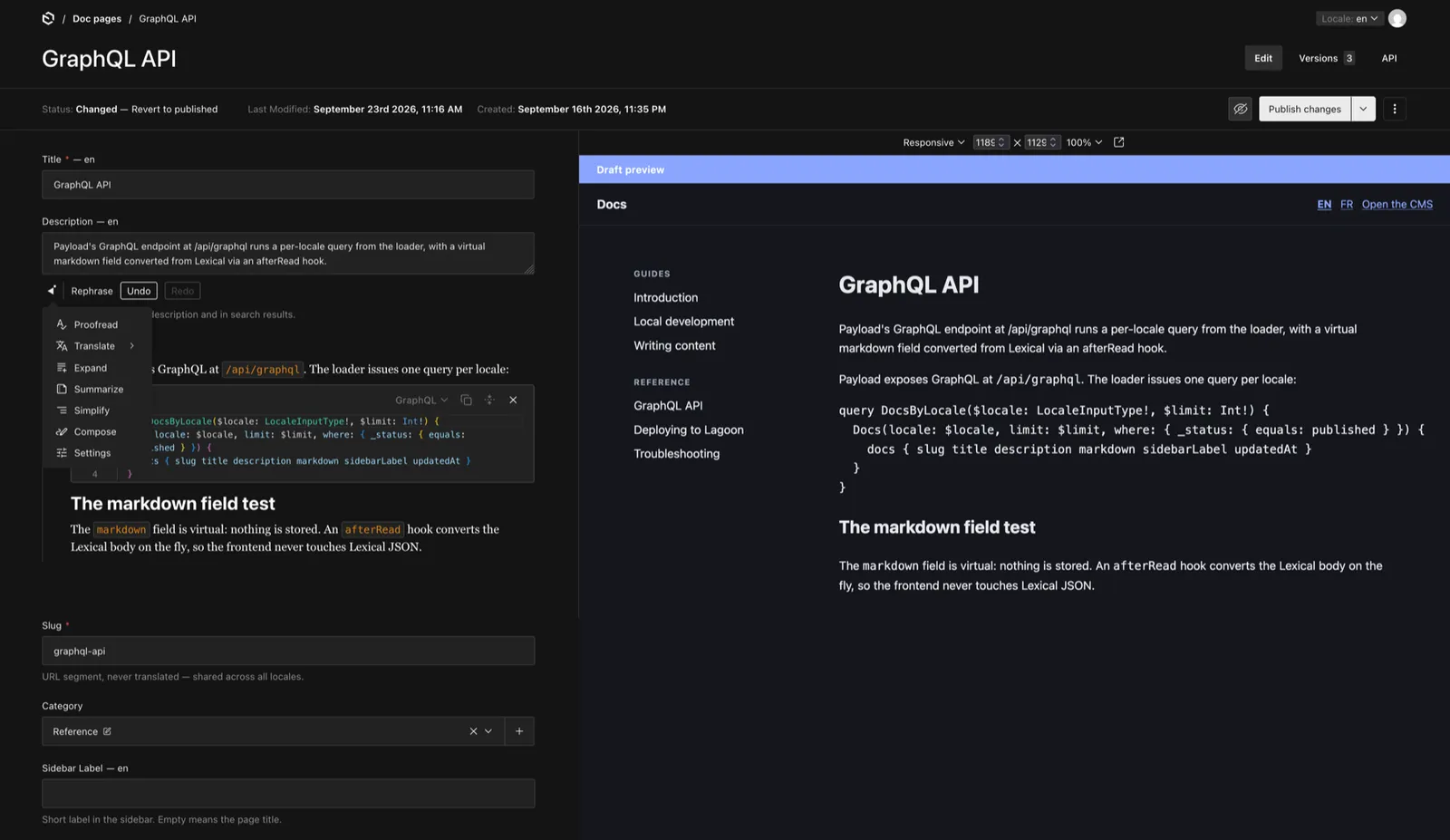
The Payload + Astro demo is a multilingual developer documentation site. The content is edited in Payload CMS and rendered statically by Astro. Drafts show up in a live preview as you type, and an AI assistant helps writing them: Compose, Proofread, Translate and Rephrase. The models are served through the amazee.ai private gateway, in the region you choose.
It is a decoupled setup, and most of the work went into keeping the two sides apart.
Architecture
apps/cms                   Payload 3 on Next.js: admin, API, GraphQL, AI assistant
apps/web                   Astro 7 hybrid site: static pages + on-demand preview
packages/ui                React components: DocPage, the Lexical serializer, blocks
packages/graphql           GraphQL documents and their generated types
packages/payload-loader    Content Layer loaders, over GraphQL
Content travels over GraphQL. Two Content Layer loaders take a snapshot of the docs and categories at build time, one entry per locale and slug.
The page bodies are Lexical rich text, and the frontend renders that JSON with a small serializer written by hand.
Payload's own converter, @payloadcms/richtext-lexical, pulls payload, @payloadcms/next and @payloadcms/ui through its peer dependencies: an entire CMS inside a static site.
What crosses the wire is plain JSON, so a structural description of the nodes is enough.
In the end, no @payloadcms/* package reaches the Astro build, apart from the live preview SDK.
The contract between the CMS and the frontend is the set of GraphQL types generated from the queries, committed so that a build never has to fetch the schema.
They describe exactly the fields the frontend asks for, which is less than payload-types.ts and easier to reason about.
A few choices that saves from silent failures:
- A CMS with nothing published fails the build on purpose. An empty site deploys without error and breaks production quietly.
- The locales are declared twice, in Payload and in Astro, but the Astro list is typed with
LocaleInputType, generated from Payload's schema. A locale forgotten on one side fails the type check. - English is served at the root and French under
/fr/, and one file knows that scheme.
Static pages and one dynamic route
apps/web is a hybrid Astro site: everything is prerendered except /preview/*.
Public pages render the DocPage React component without a client directive, so React runs at build time and the HTML ships with zero JavaScript.
The preview route renders the same component inside an island.
Using one serializer for both is what makes the preview trustworthy: what you see while typing is what will be published.
Live preview
Open a doc in the admin, and the Live Preview panel shows the Astro page in an iframe that updates as you type, without saving.
The preview route compares a secret, reads the draft over GraphQL with the API key of a dedicated preview user, and hydrates PreviewIsland (client:only="react").
The island calls Payload's useLivePreview, which receives every form change over postMessage, posts the unsaved document back to Payload so hooks run and relationships are populated, and renders the result with DocPage.
Troubleshooting:
- The
serverURLgiven to the island must be the exact origin of the admin, without a trailing slash: the SDK compares it withevent.origin. - The
depthofuseLivePreviewmust match the depth of the initial GraphQL fetch, or relationships vanish with the first message. - The preview URL has to be in Payload's
corsandcsrflists. Otherwise the SDK's request fails silently and nothing updates.
The preview is never cached or indexed: Cache-Control: no-store, X-Robots-Tag: noindex, nofollow and a noindex meta tag.
The AI assistant
Payload's core ships no LLM client (yet, at the time of writing).
The assistant comes from a community plugin, payload-ai (@ai-stack/payloadcms), which drives the Vercel AI SDK.
Its OpenAI provider accepts a custom base URL, and the amazee.ai gateway is a LiteLLM proxy, so the OpenAI protocol is all it needs.
Click into a field and a bar appears under it: Compose when the field is empty, Rephrase, Proofread and Translate once it has content. Settings opens the prompt, model, temperature and max tokens of that field.
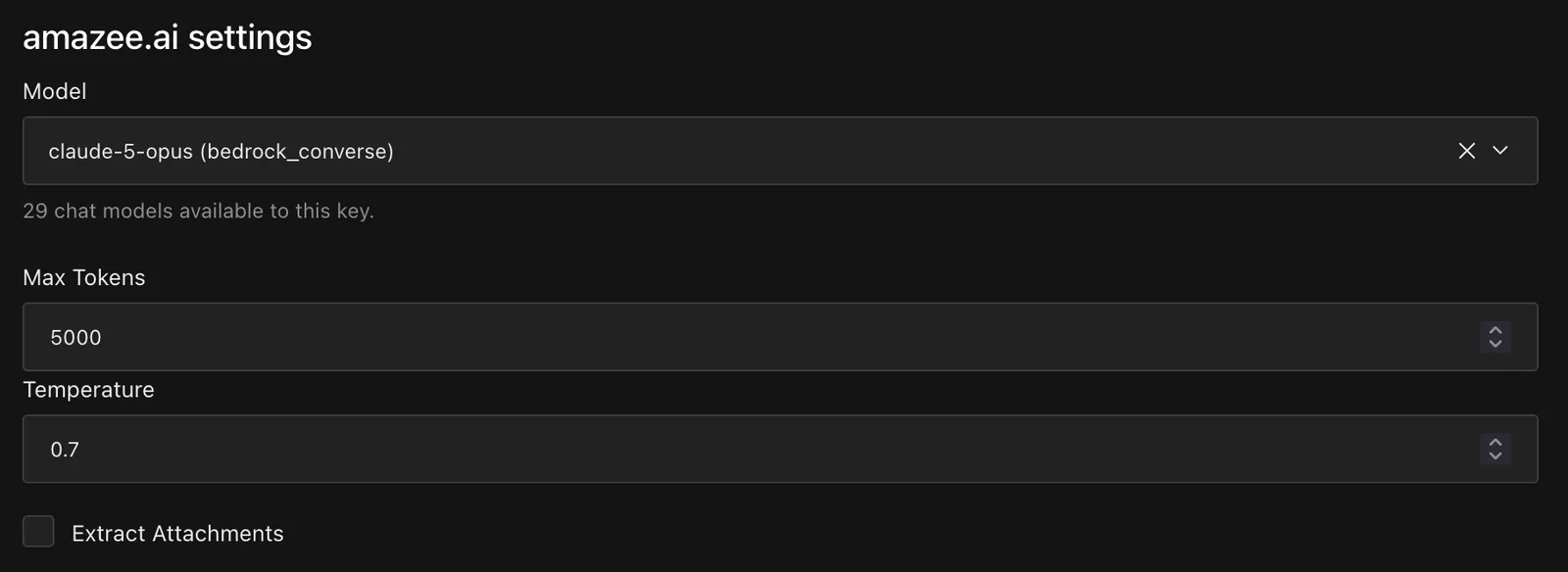
Everything specific to amazee.ai lives in apps/cms/src/ai/:
- The token and the base URL are read from
AMAZEE_AI_API_TOKENandAMAZEE_AI_BASE_URL. The plugin reads theOPENAI_*variables by default, and avoiding those names means the private token can never reach api.openai.com. - The plugin's hard-coded list of GPT models is replaced by a picker fed by the gateway: an endpoint proxies LiteLLM's
/model/info, keeps the chat models and caches the list for ten minutes, with a fallback list in the environment. - The prompts are seeded as static Handlebars templates over the document (
{{ title }},{{ toHTML body }}). Without them, the plugin asks a model to write each field's prompt at boot, one request per field. - Generation is restricted to logged-in users, and the whole assistant is off without a token.
Rich text is the tricky part: the model returns the whole Lexical JSON of the field, constrained by a JSON schema and streamed over the OpenAI Responses API.
I verified it on the de-eu101 region with the chat alias and with Claude Sonnet.
A small open-weight model may return invalid JSON.
Run it
cp .env.example .env   # set AMAZEE_AI_API_TOKEN
                       # + AMAZEE_AI_BASE_URL if your region is not de-eu101
pnpm install
pnpm dev               # PostgreSQL, demo content on first run,
                       # Payload (:3000) + Astro (:4321)
You need Node 22 or later, pnpm and Docker for the local PostgreSQL. An amazee.ai key is optional: without it, the site and the CMS run without the assistant. The repository also documents a deployment on Lagoon.
What is not there yet, and would make good next steps: media storage in production, syntax highlighting, search, and connection with the amazee.ai vector database (embeddings, semantic search).